What is M-Pesa API and How Does It Work for Businesses?
The Short Answer
M-Pesa API is the technical interface that lets your website or app communicate directly with Safaricom's M-Pesa system.
Automatically, without manual intervention.
Safaricom's official name for it is Daraja, which means "bridge" in Swahili.
It bridges your business systems and M-Pesa.
Quick Takeaway
M-Pesa API = your system talks to Safaricom automatically
No more manually checking statements or reconciling payments
Customers get an instant PIN prompt on their phone when they pay
You get an automatic confirmation the moment payment goes through
Not every business needs it — this guide helps you decide
M-Pesa API vs Regular Paybill. What's the Difference?
This is where most business owners get confused.
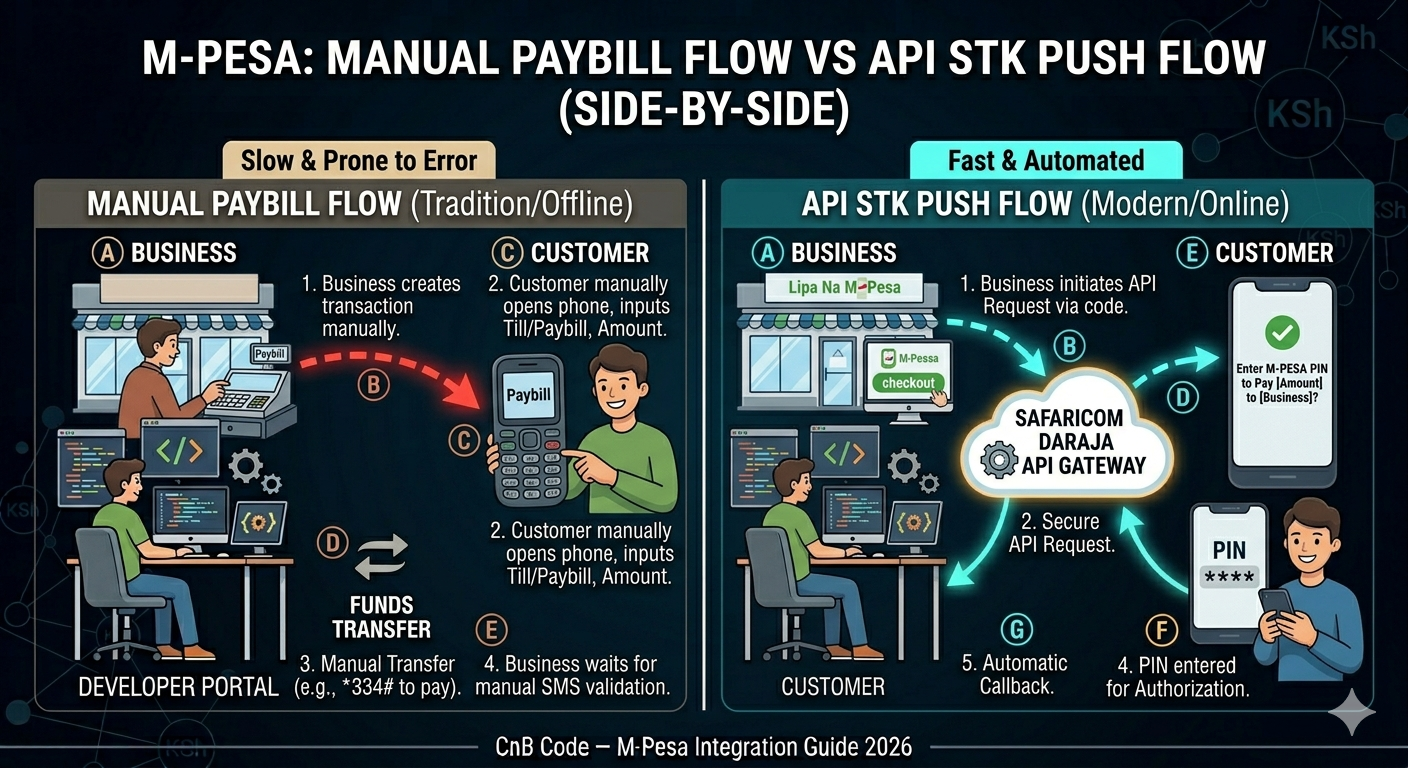
Regular Paybill:
Customer opens their M-Pesa menu and sends money manually
You check your M-Pesa statement later to confirm payment
No automation — someone has to reconcile transactions manually
Works fine for low volumes and informal setups
M-Pesa API (Daraja):
Your website triggers the payment automatically
Customer receives a PIN prompt directly on their phone
Payment confirmed instantly back to your system
Order updates, receipt sends, inventory adjusts — all automatic
No manual checking, no reconciliation headaches
If you're processing more than a handful of transactions daily, the manual Paybill process becomes a real operational burden.
That's when API integration starts making sense.
How M-Pesa API Actually Works
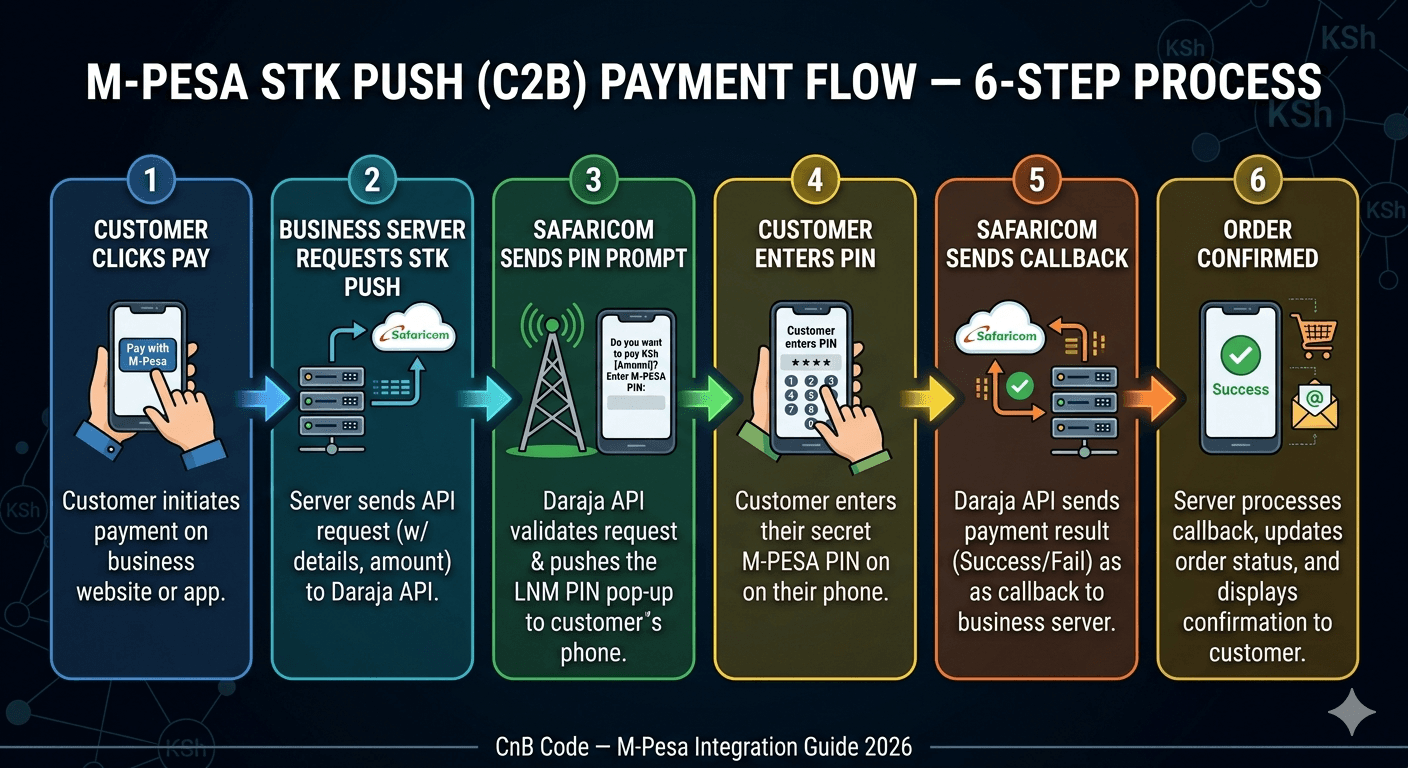
The most common API flow for business websites is called STK Push — here's what happens when a customer pays:
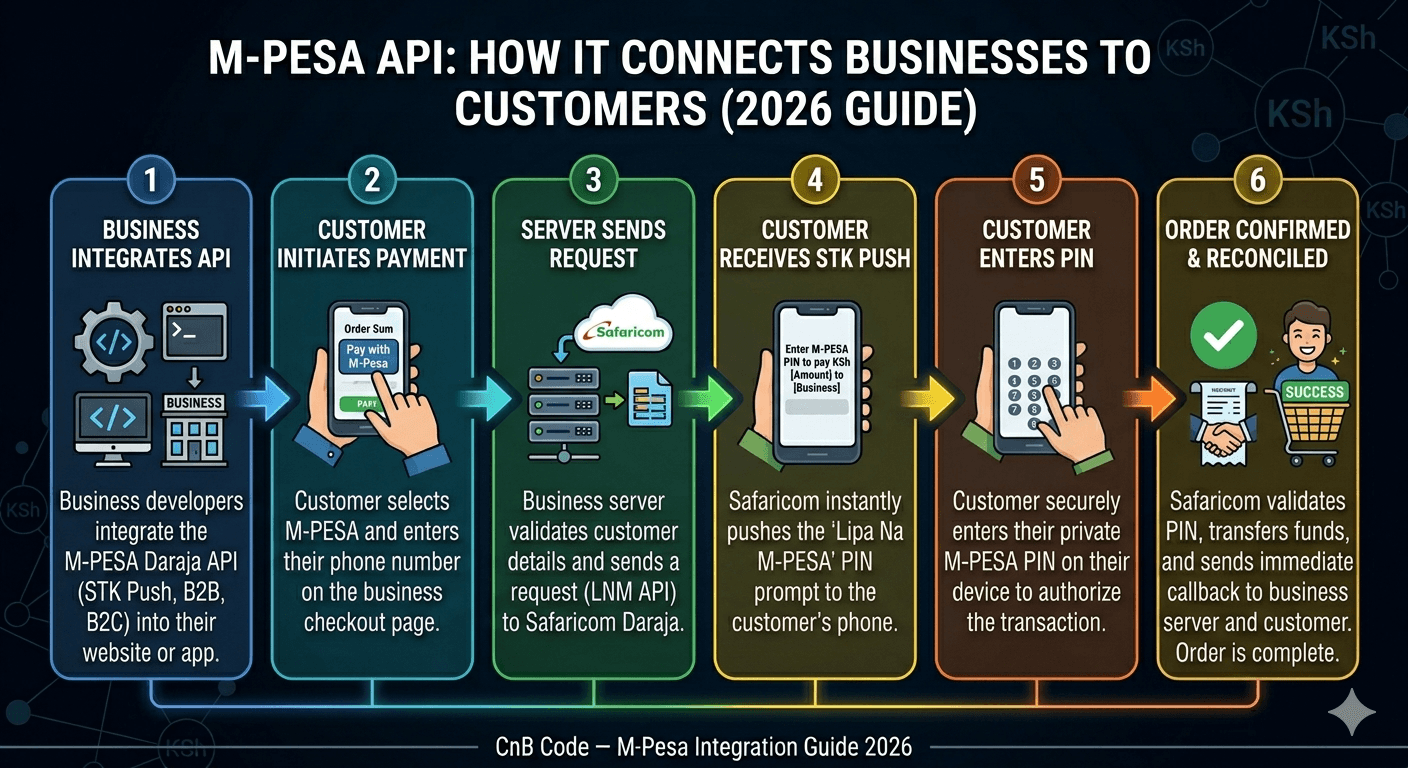
Customer clicks "Pay with M-Pesa" on your website
Your system sends a request to Safaricom with the customer's phone number and amount
Safaricom sends a PIN prompt directly to the customer's phone
Customer enters their M-Pesa PIN
Safaricom sends a payment confirmation back to your system automatically
Your system updates the order, sends a receipt, and moves on
The entire process takes under 30 seconds.
The customer never leaves your website, never opens their M-Pesa menu manually, and never has to call anyone to confirm payment.
What Can You Do With M-Pesa API?
Daraja is not just for accepting payments. Here's the full picture:
Accept payments (C2B / STK Push)
Standard customer checkout on your website or app
Automatic confirmation and order processing
Most businesses start here
Send money to customers (B2C)
Automated refunds when orders are cancelled
Commission payouts to agents or affiliates
Salary disbursements for gig workers
Requires separate Safaricom approval beyond basic STK Push
Business to business payments (B2B)
Transfer funds between Paybill numbers
Useful for supplier payments and inter-business settlements
Account balance and transaction status
Check your M-Pesa balance programmatically
Query the status of a specific transaction
Useful for reconciliation and reporting systems
What is Daraja 3.0?
Safaricom launched Daraja 3.0 in November 2025 — the most significant upgrade to the platform since Daraja 2.0 in 2019.
What changed for businesses and developers:
Cloud-native infrastructure — better uptime and reliability
Redesigned documentation — faster to understand and implement
New Security APIs — built-in fraud detection and identity verification
Faster onboarding — fewer steps to get from registration to go-live
Capacity for up to 12,000 transactions per second
If you are integrating M-Pesa for the first time in 2026, you are building on Daraja 3.0. The experience is meaningfully better than what developers dealt with in earlier versions.
Do You Actually Need M-Pesa API Integration?
Not every business does. Here's an honest breakdown:
You likely need API integration if:
You run an e-commerce store and process 50+ transactions daily
You need automatic order confirmation without manual checking
You send money out to customers, agents, or vendors regularly
You want payments integrated into your accounting or inventory system
You're building a SaaS product with subscription billing
You may not need it yet if:
You process a small number of transactions weekly
Manual Paybill reconciliation takes less than an hour a day
You're still validating your business model and need to move fast
Faster alternatives if you're not ready for direct integration:
WordPress site — use an M-Pesa plugin, live in hours
Any platform — use a payment gateway like Paystack, Pesapal, or others
There are several payment gateway options available to Kenyan businesses beyond just Paystack and Pesapal — including bank-backed options like Buni by KCB, and others.
We cover all available options with an honest comparison in our upcoming guide: Best Payment Gateways for Kenyan Businesses in 2026.
For now, if you need to compare Paystack and direct Daraja integration specifically on cost, see our Paystack vs Direct M-Pesa breakdown.
Getting Started With M-Pesa API
If you've decided API integration is the right move, here's where to begin:
What you need before anything else:
Business registration (sole proprietor, limited company, or NGO)
Safaricom Paybill or Till number
Valid SSL certificate on your server
A backend developer or technical capacity in-house
First steps:
Create a free developer account at developer.safaricom.co.ke
Explore the sandbox environment — no real money involved
Decide between DIY development or hiring a developer
Read our step-by-step M-Pesa integration guide to understand exactly what the process involves
Review what M-Pesa API integration actually costs before budgeting
The Bottom Line
M-Pesa API turns manual payment collection into an automated system.
Customers get a seamless checkout experience.
You get instant confirmations, automatic reconciliation, and no more statement checking.
Whether you need it depends on your transaction volume and operational setup.
If you're processing meaningful daily volume, the investment pays for itself quickly in time saved and revenue protected.
If you're ready to explore integration, talk to our team
We'll tell you honestly which path makes sense for your business.
Written by the Engineering Team at CnB Code
We build fast, scalable applications, complex API integrations, and automate business workflows. Based in Nairobi, serving ambitious businesses globally.
Need help implementing this? We're here to help.
Our engineering team at CnB Code specializes in building and integrating custom software solutions just like this for forward-thinking businesses.
Recommended for you
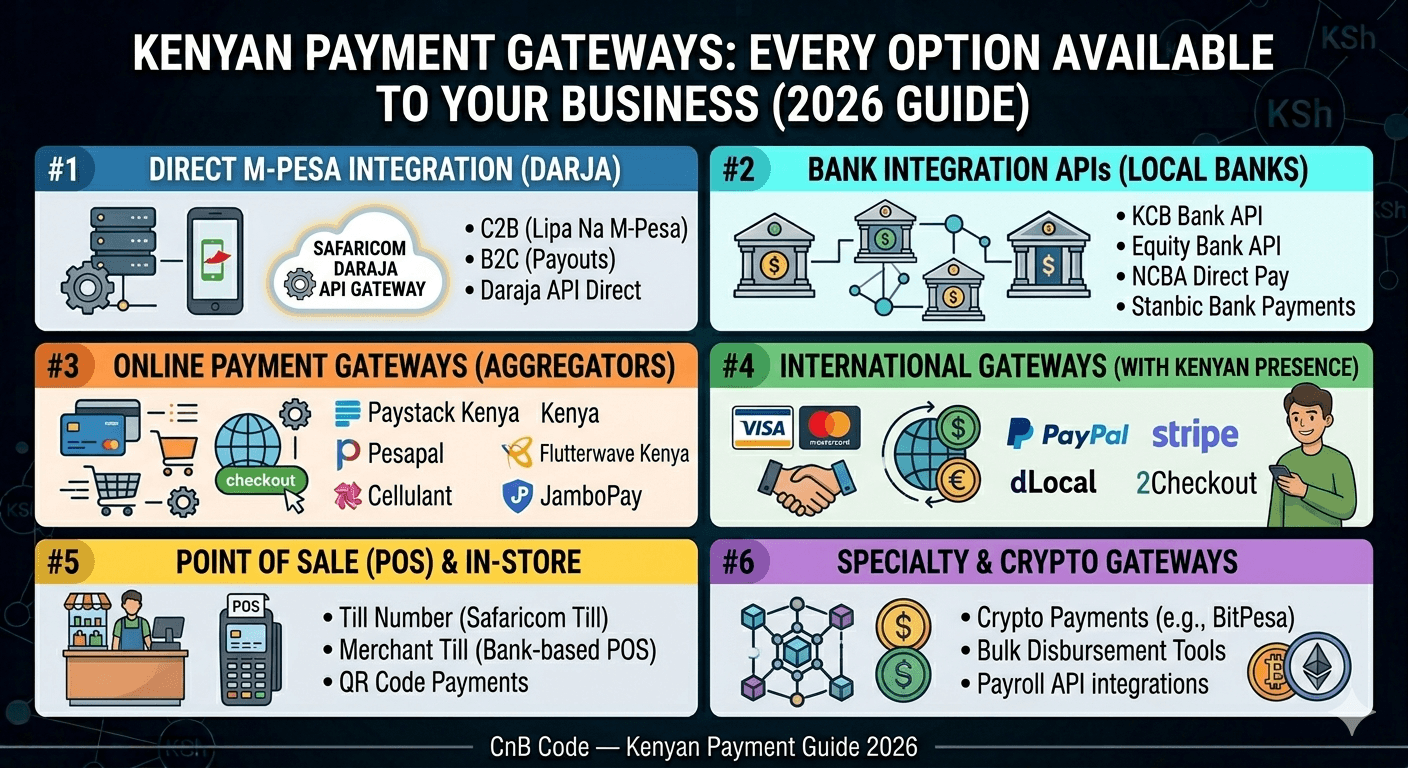
Payment Gateways in Kenya: Every Option Available to Your Business (2026)
Every payment gateway available to Kenyan businesses in 2026 — M-Pesa, cards, bank APIs, and cross-border options. Fees, features, and who each one is best for.
How to Integrate M-Pesa API: Complete Guide 2026
Three ways to integrate M-Pesa on your website in 2026 — WordPress plugin, third parties, or direct Daraja API. Pick the right path for your stack and budget.